
Skip to content
msu_banner
msu_banner

Breakout Learning at Broad / MSU: Instructor Guide

A quick reference for adding and configuring Breakout Learning in D2L.

What is Breakout Learning?

Breakout Learning is a platform for AI-evaluated small-group discussion assignments. Students meet synchronously over video to work through an assigned topic, scenario, or case, and the AI evaluates each student's contribution to the discussion. Results sync back to the D2L gradebook.

What can I use Breakout Learning for?

Breakout helps you run substantive small-group discussions in any course where conversation matters — and evaluate every one of them, in any class size. A few ways Broad faculty use it:
  • Replace the discussion board

    Replace the discussion board

    Forum posts are increasingly AI-generated and easy to phone in. In a Breakout discussion, students have to show up, think on their feet, and talk to each other.

  • Work through a scenario

    Work through a scenario

    Present students with a realistic situation, share the relevant facts, and ask how they'd approach it. Group discussion gives every student a chance to take a position, hear their peers, and explain their reasoning — and you'll see exactly what each one contributed.

  • Practice the judgment calls of the job

    Practice the judgment calls of the job

    Use Breakout for the conversations students will actually have in their careers: performance reviews, negotiations, ethical decisions, pushing back on a stakeholder. These are the moments where collaboration, communication, and critical thinking matter most — the same skills employers look for, and the ones Breakout evaluates.

Pre-work for any discussion can be whatever fits your course — a textbook chapter, an article, a podcast, a video.

Curious how Breakout could work in your classroom? Book a 15-min consult with Eduarda, MSU alum and account manager.

How do I access Breakout Learning?

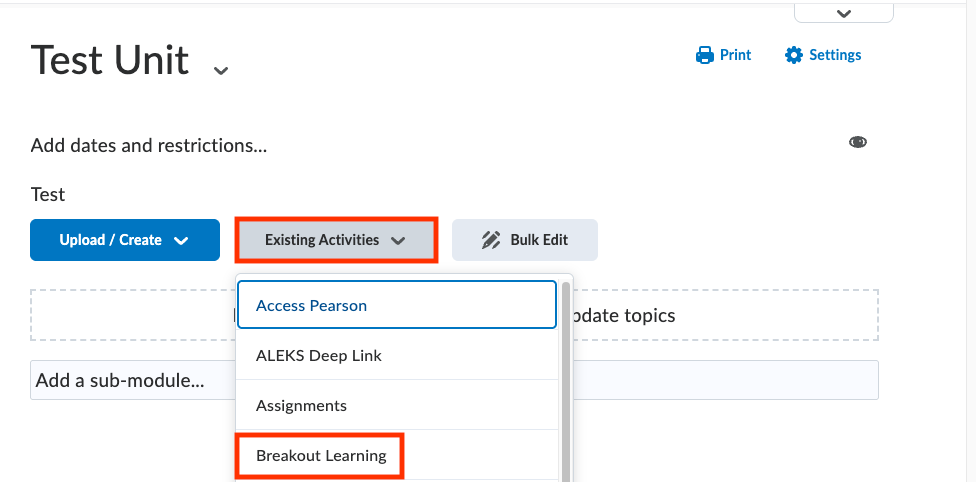
From your course, click the Content tab, or click Create some content on your course homepage.
You will find Breakout Learning under Existing Activities.

  • 50ce3747ba349acf61d8b59c6310d71eec2c1db8
  • 981f8624aa369265534d58fa9594f2c798b3a107

Can’t find it?

If Breakout Learning doesn’t appear under Existing Activities, contact the MSU IT department.

How do I access my Breakout modules?

  • 01

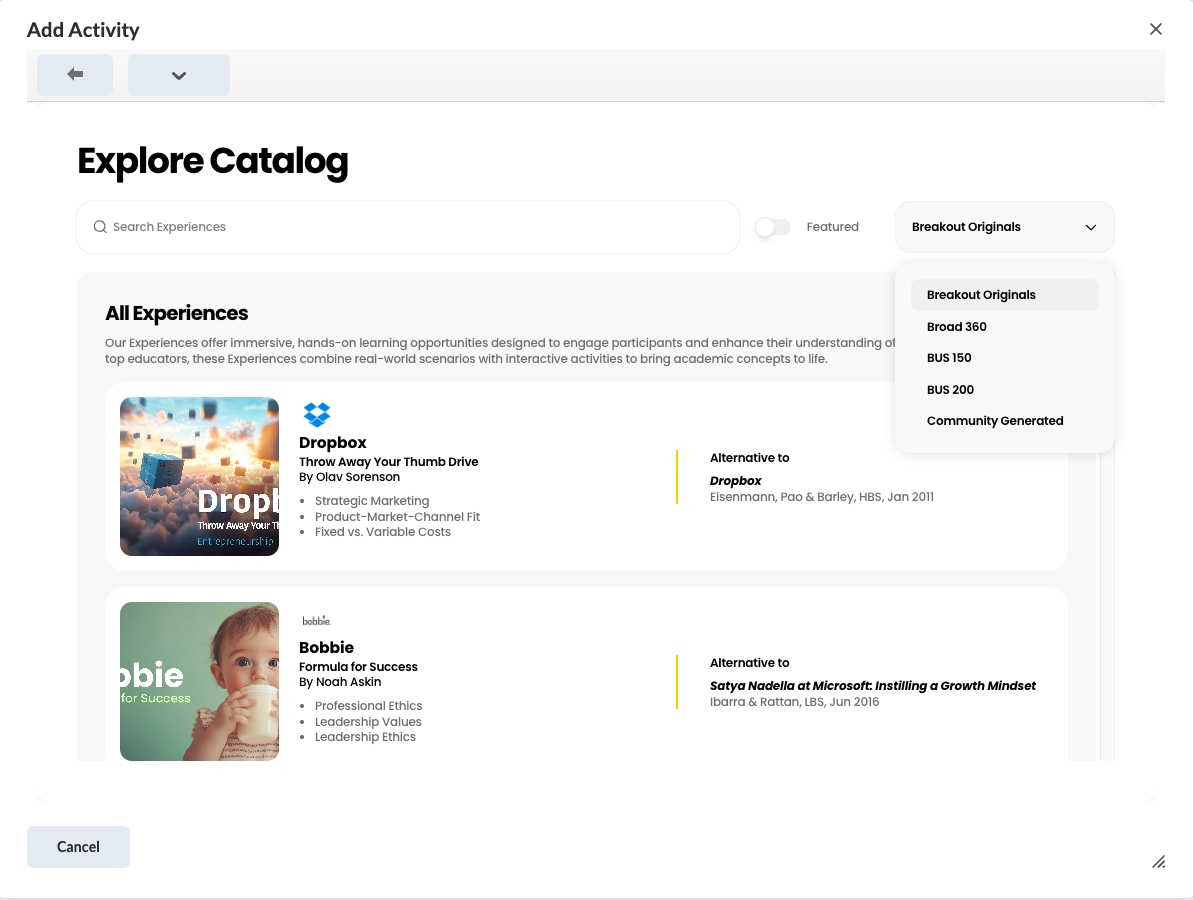
    After clicking Breakout Learning, you’ll see the Explore Catalog window. Select the catalog you need from the dropdown — Broad typically has a private catalog (e.g., Broad 360) alongside the default Breakout Originals. Make sure you’re in the right one before browsing.
    • fadd73700e4ce70114ba58c37d78b68cc463086a-Jun-23-2026-09-44-57-5665-AM
  • 02

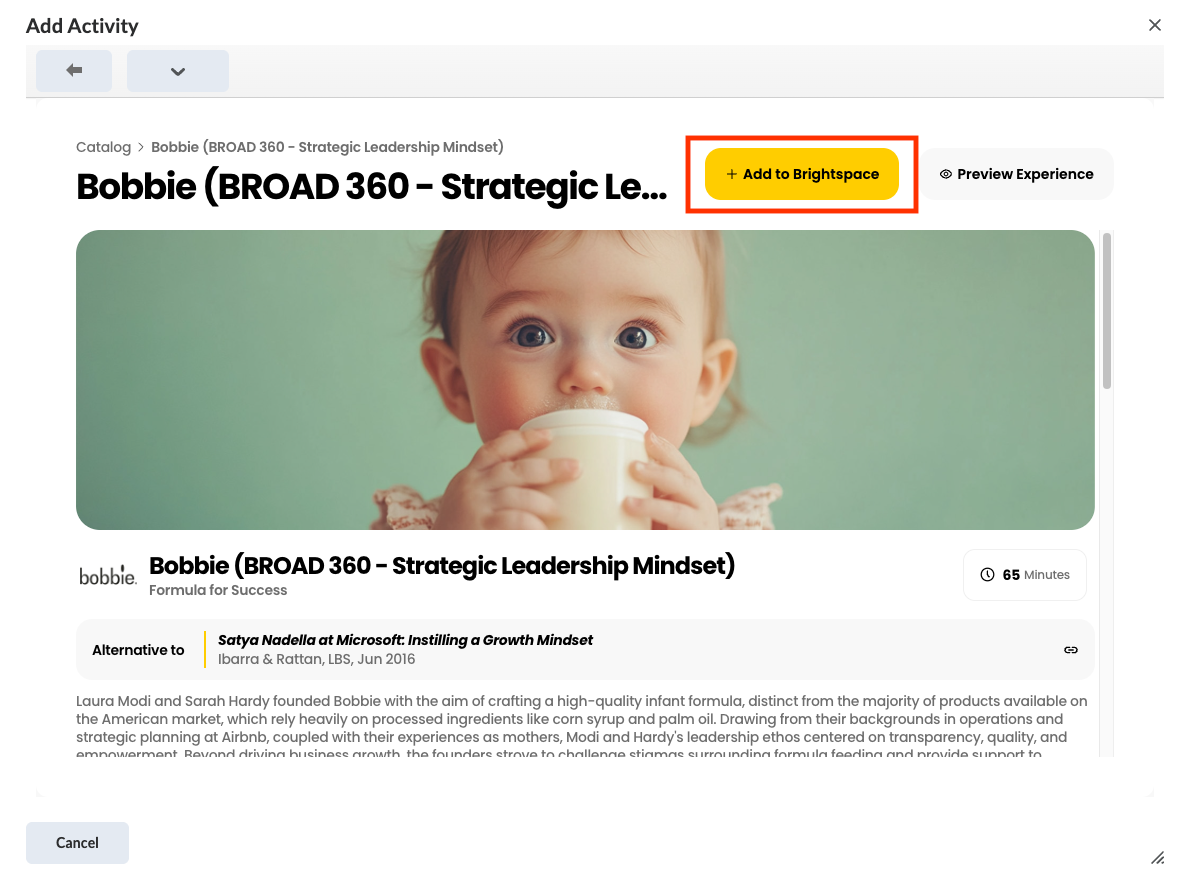
    Select your module and click Add to D2L.
    • fb2909f36063f2b809e93fe83750d52daaffcd61
  • 03

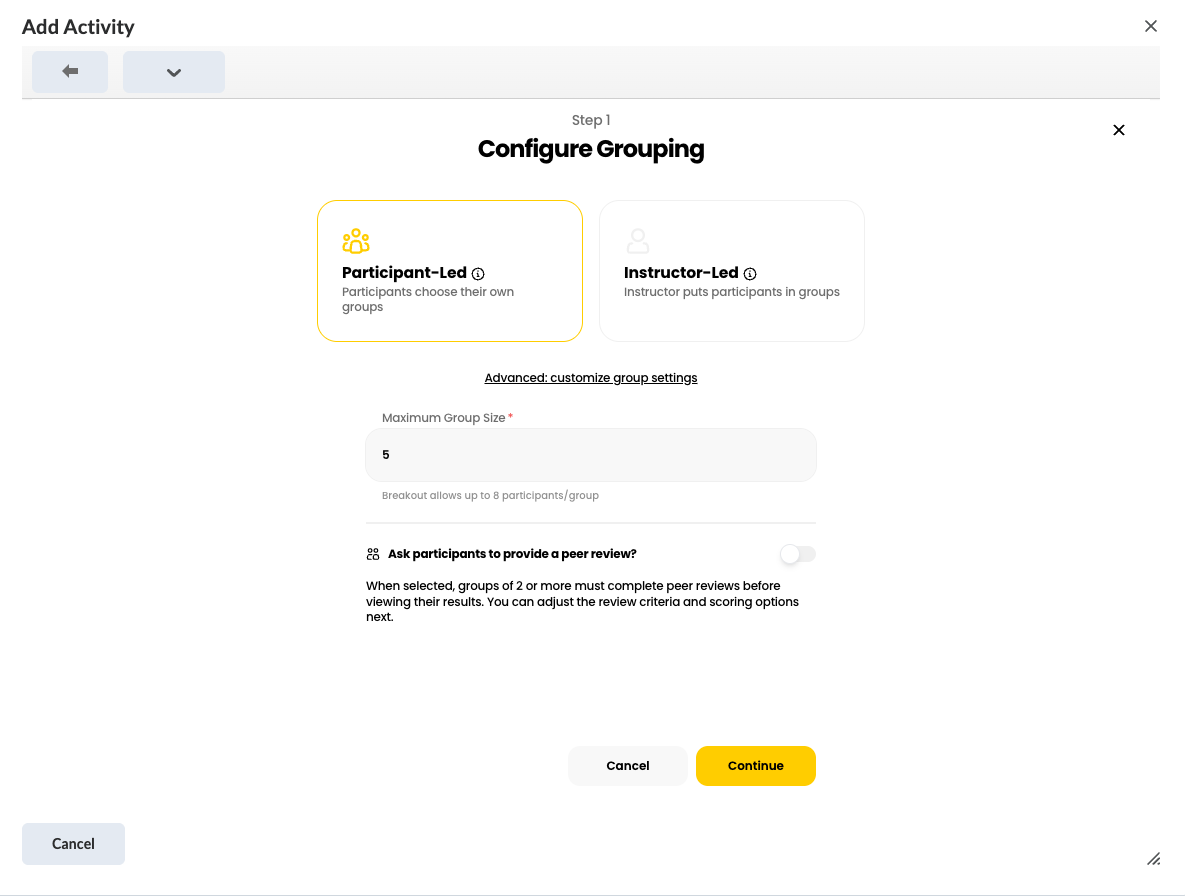
    Configure your grouping.
    • 66a87e1a7f34200720b9a759f527d8a9d6e9c4dc
  • 04

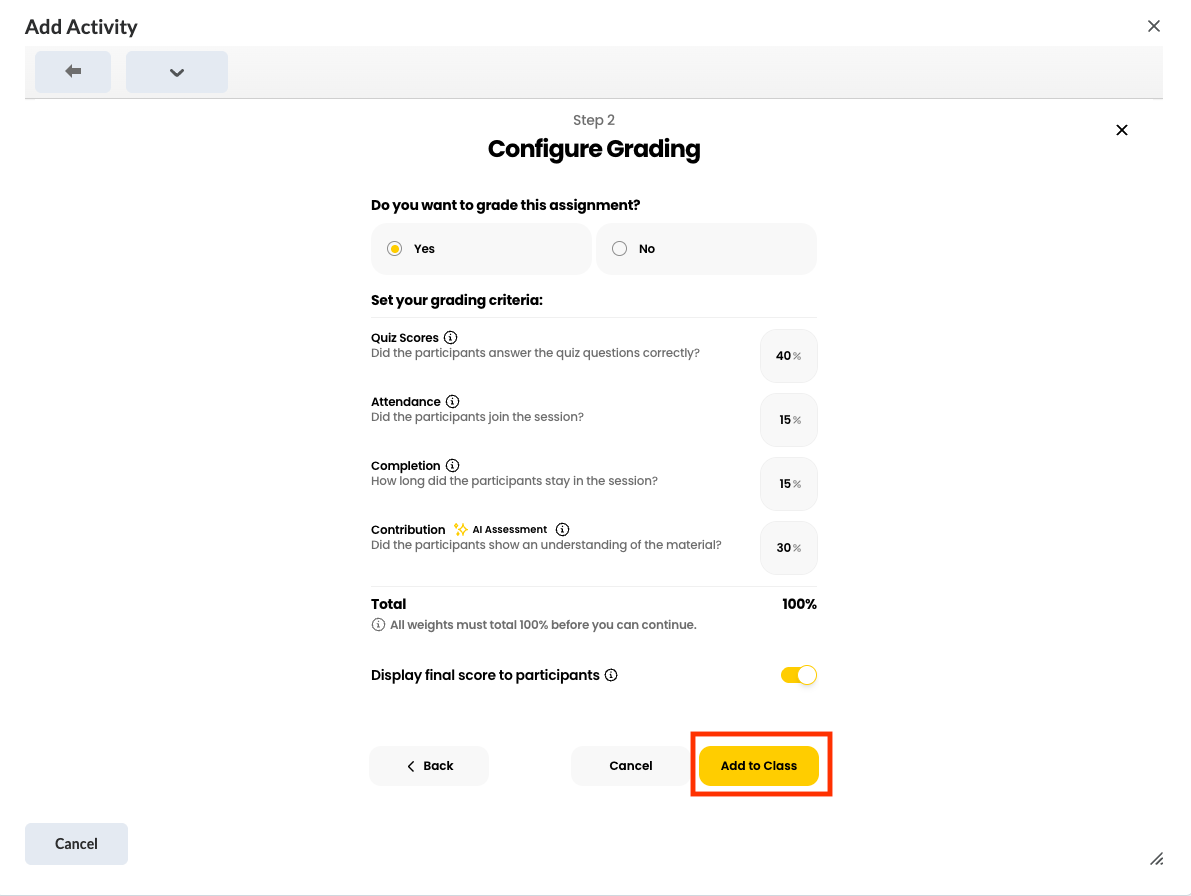
    Choose your grading configuration and click Add to Class.
    • d17ac6449e21137bc40103beecb7c88f30af4b93
  • 05

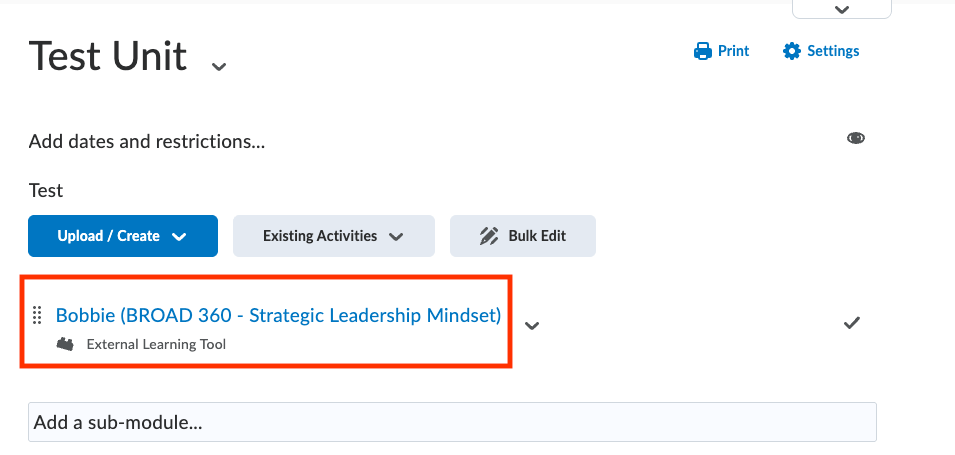
    Your module will appear in your Course Content. Click the blue text to finish setting up your module.
    • 1f08b2cf6636c75ce423c9843ec1eade5f834d39

Configuring your module

  • 01

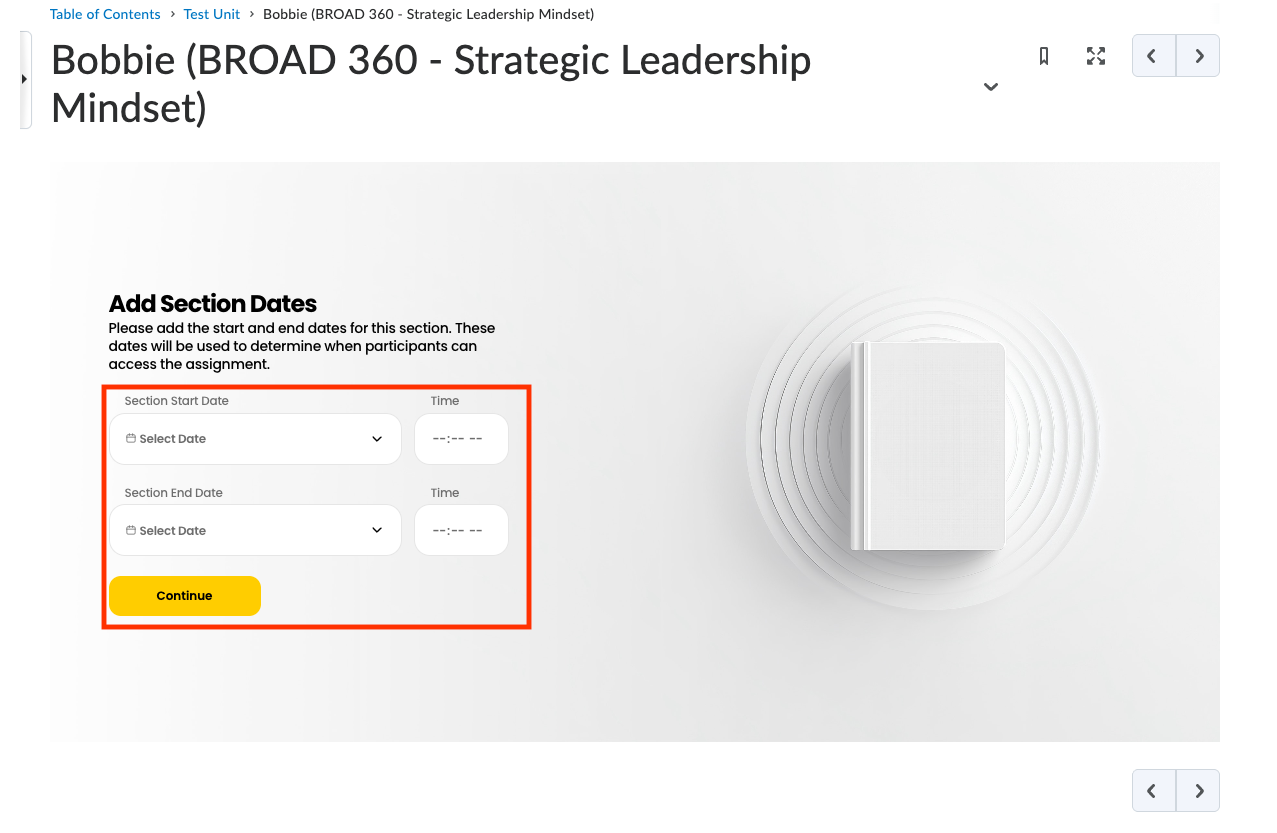
    Section dates

    Configure your section dates. These are the start/end dates of your class, not your assignment. If you’ve already configured these dates in D2L, you won’t see this screen.
    • aa894ced619d875fc0fa757cc94ef0c3f3f94f15
  • 02

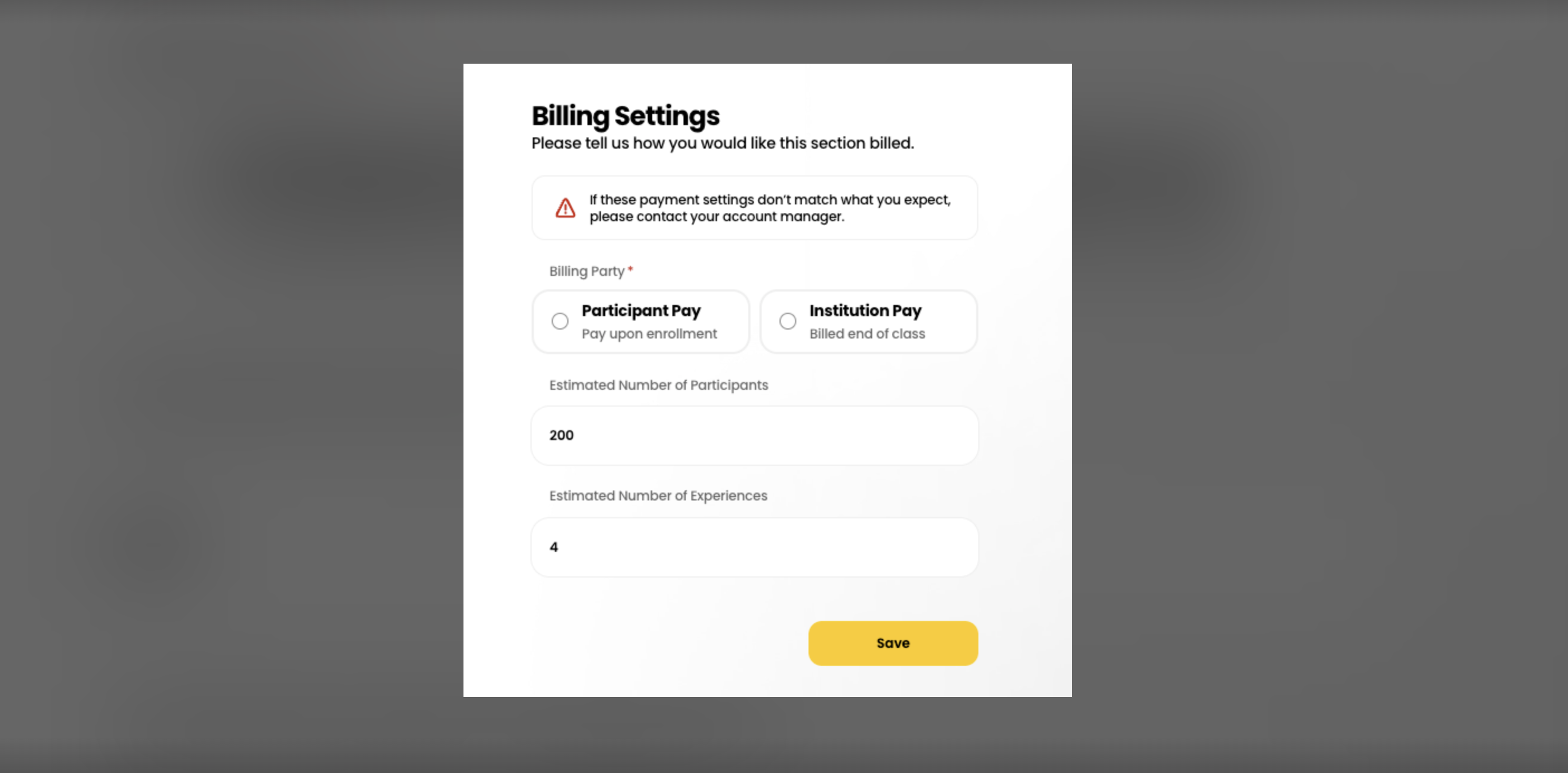
    Billing settings

    Select your billing settings. Scroll down to enter the expected number of participants.
    • 1a277eb5f066df3076e7075353d89814391ab60e
    • aa61c72374a85efa2092b31d3511d0ce4c6e6424
  • 03

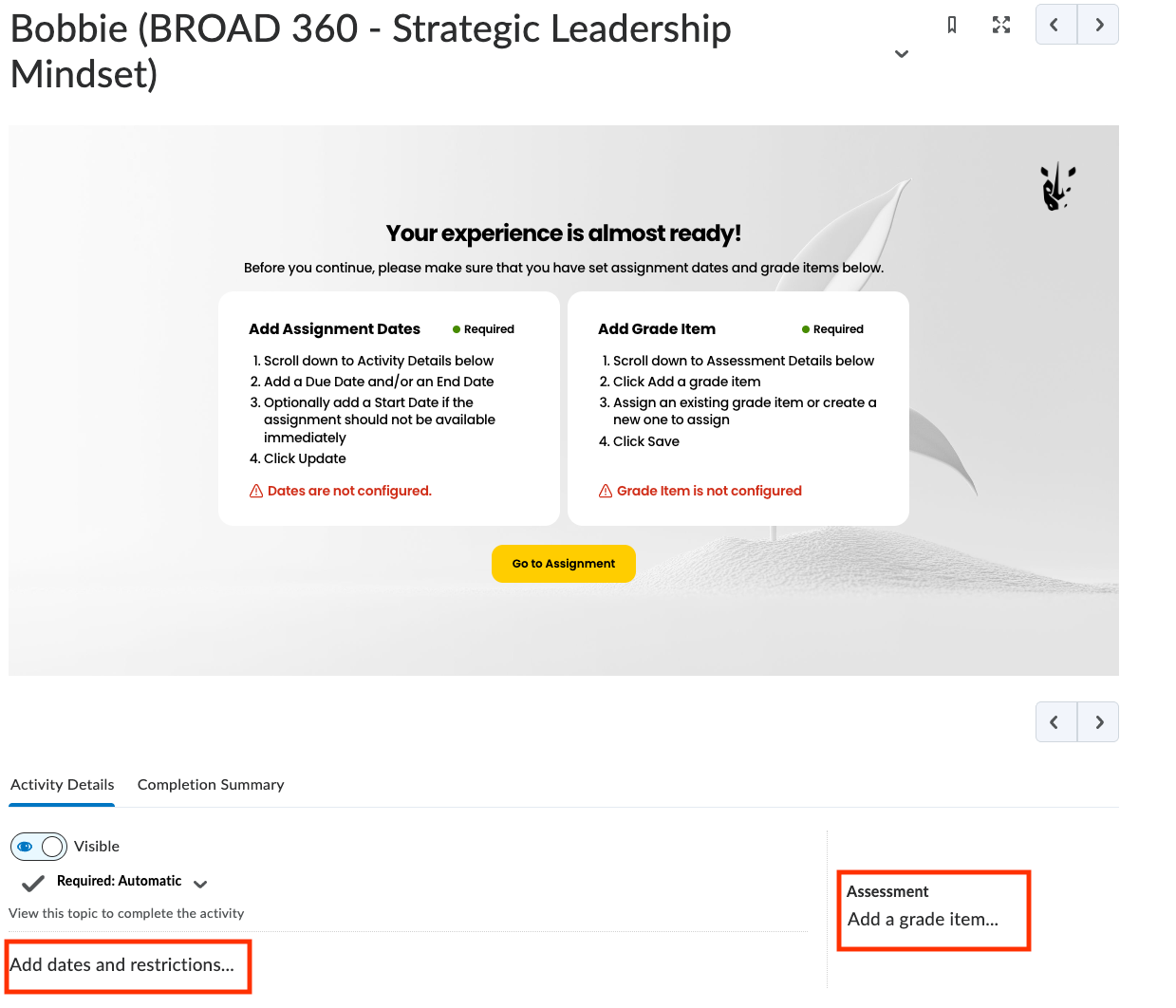
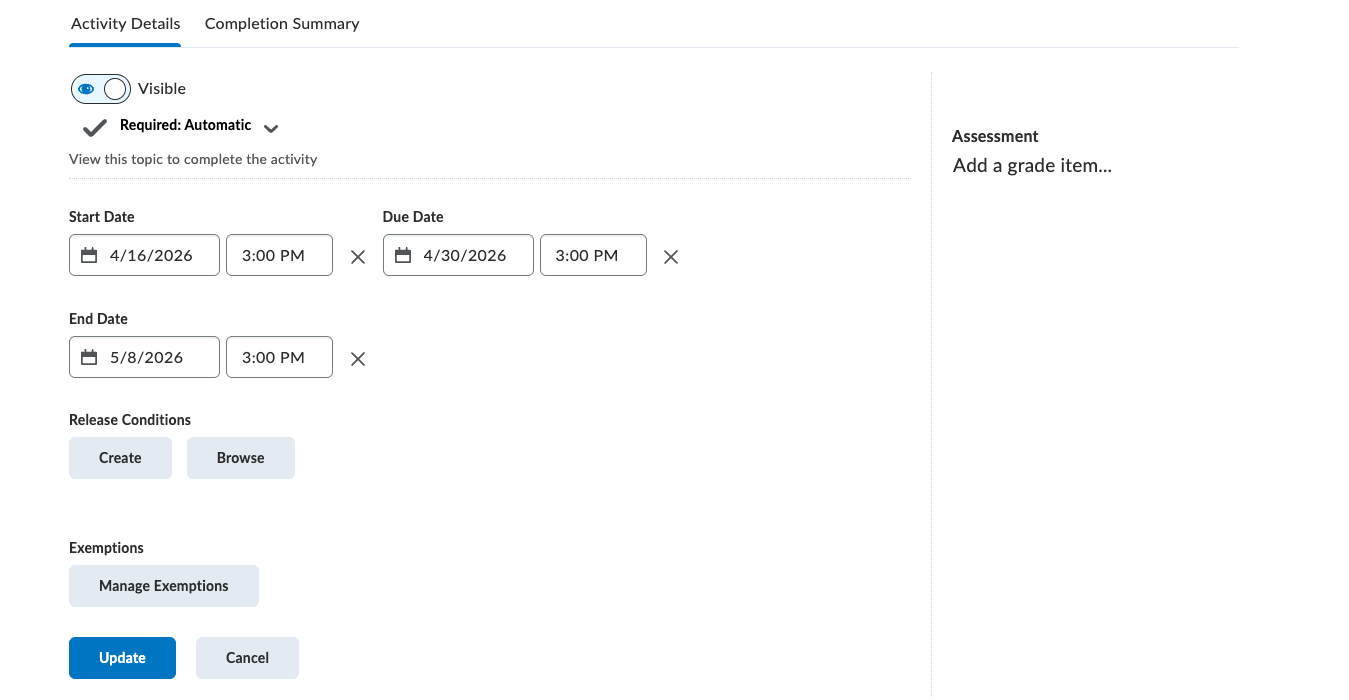
    Assignment dates and grade item

    Select your billing settings. Scroll down to enter the expected number of participants.
    • d619f9bb29c2f6c6b7acccf8b9a835b682f713b7
    • b205d8f2ec6d0d16e601a90cb0ac0d7dc025aacc

Your setup is now complete.

From here: the Breakout instructor portal

Once your assignment is configured, clicking into it takes you to the Breakout instructor portal, where you can review student groupings, monitor discussion status, and view results. For detailed walkthroughs of those features, see the Breakout Learning Knowledge Base.

What will my students see?

Students will access Breakout Learning in D2L like any other activity. First, they will be prompted to pay.
To access Breakout Learning, there are 2 possible methods:

Student Pay - the cost of accessing the Breakout Learning modules is the responsibility of the participant.

Institutional Pay - the cost of accessing the Breakout Learning modules is the responsibility of the institution.

If the method being used is Student Pay, students will be prompted to pay via Stripe on their first access.

In the case of Institutional Pay, students will not encounter a paywall.

Financial Assistance:
For students experiencing true financial hardship where they do not have a university-supported path, Breakout can work with them to provide support for discounted purchase of materials.

Students experiencing financial hardship may apply for assistance here: https://www.breakoutlearning.com/legal/student-financial-hardship-policy

After paying, students will be guided through joining their small group and participating in a facilitated video discussion. Their discussion is evaluated by Breakout’s AI. Grading weights are configured by instructors, and consists of a combination of AI evaluation, participation, completion, and quiz scores (if applicable). Grades sync back to the D2L gradebook.

If you’d like to preview the full student experience before assigning, reach out to the Broad LTD team or eduard.vieira@breakoutlearning.com — we can walk you through it.


Troubleshooting

Grades aren’t passing back to the expected grade item

Open the assignment, go to Assignment Settings → Edit Grading, and make sure the correct D2L grade item is selected.

Something else unexpected?

Email integrations@breakoutlearning.com — our integrations team handles D2L-specific issues directly.

Get help

Broad LTD team — for MSU-specific questions, access issues, or to be connected with other Broad faculty using Breakout.

Breakout Integrations — integrations@breakoutlearning.com for D2L setup, grade passback, or other technical issues.

Knowledge Base — for detailed articles on using the instructor portal and reviewing results.