
Happy spring! This quarter's biggest update puts your students' discussion data to work for you.
With the new Insights Tab, you can now use AI-powered prompts to explore what students actually discussed, how they engaged with your learning objectives, and where the gaps are. It's one of the most-requested features we've built, and it's live now.
Alongside Insights, we shipped smarter search tools, cleaner instructor workflows, and more reliable LMS integrations. We've also got a packed roadmap to share — including VPAT certification, customizable grading controls, and Inclusive Access support.
Let's get into it.
✨ New: Instructor Insights Tab (Beta)
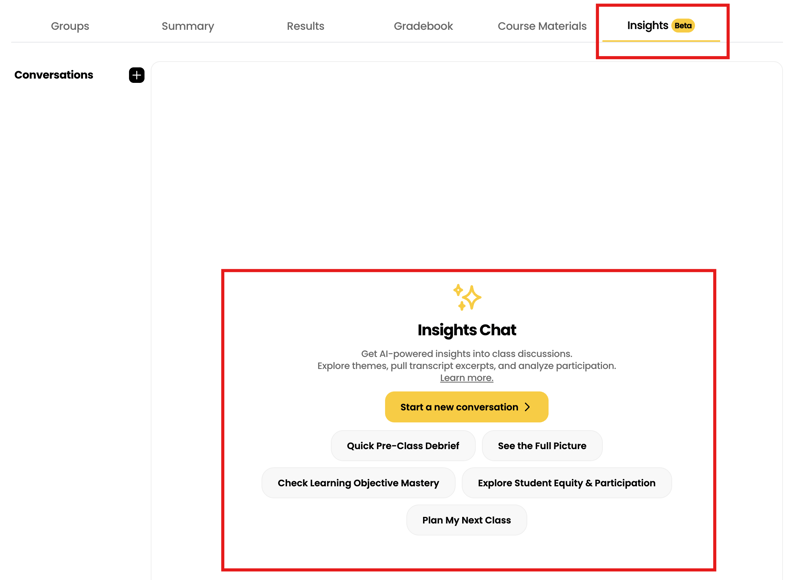
The Insights Tab is now live on your assignment pages, giving you AI-powered tools to explore what actually happened in your students' discussions.
Instead of reading every transcript yourself, you can now use curated prompts to quickly surface the information that matters most for your teaching:
- Quick Pre-Class Debrief — Get the highlights before you walk into your next session.
- See the Full Picture — Understand what students discussed, where they struggled, and what clicked.
- Check Learning Objective Mastery — See how well students engaged with the specific concepts you wanted them to practice.
- Explore Student Equity & Participation — Identify who's contributing and where engagement gaps might be forming.
- Plan My Next Class — Get data-driven suggestions for reteaching moves, discussion launch points, and gap-closing questions.
You can also start a free-form conversation to ask your own questions about the session data.
📅 New: Configurable Date Column on Assignments Table
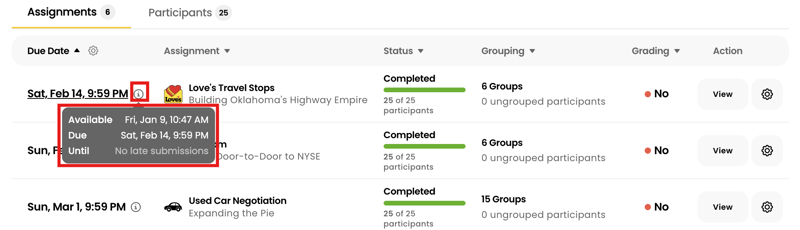
Your assignments table now gives you a clearer view of timing at a glance.
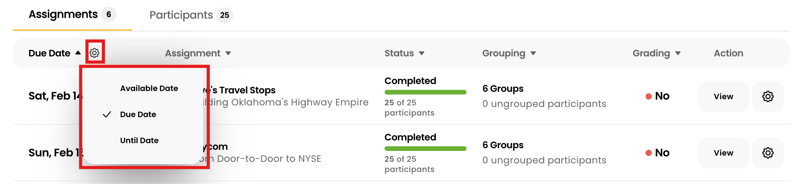
A new configurable date column lets you choose which date to display — Available Date, Due Date, or Until Date — and a tooltip on each assignment shows all three together.
No more clicking into individual assignments to check when things open, close, or stop accepting late work.
🔍 Smarter Catalog Search
Finding the right content in Breakout's catalog just got easier.
- "Featured" filter — Quickly surface our most recommended and proven discussion modules.
- Persistent search filters — Navigate away from the catalog and come back without losing your search criteria. No more re-entering filters every time.
Small changes, big quality-of-life improvement — especially if you're browsing content across multiple disciplines or comparing modules for different sections.
📋 Instructor Workflow Upgrades
We shipped a handful of additional improvements this quarter designed to reduce the day-to-day friction of managing assignments and classes:
- Cancelled assignments are now hidden by default in your class view — less clutter, cleaner interface.
- Rubric names now display above descriptions on the Experience preview page, so you can reference evaluation criteria more quickly.
- Unassign all groups in one action — useful when you need to reset groupings for an assignment.
Course Material role limitations are now visible on Experience pages, so you can see at a glance which materials are restricted to specific roles.
⚡ More Reliable LMS Grade Sync
For instructors using Canvas or Brightspace D2L, we've made grade syncing faster and more dependable:
- Batch processing now prevents timeouts when syncing grades for large classes.
- Better error handling for grade sync failures on LMS-connected courses.
- Brightspace cross-browser fix — the assignment confirmation flow now works reliably on Firefox, Safari, and Edge, not just Chrome.
These are behind-the-scenes improvements, but they directly reduce the "why didn't my grades come through?" support requests that can disrupt your semester.
🗺️ Coming Soon
VPAT & Accessibility Certification (April)
We've completed a comprehensive accessibility audit with Allyant, resolving all Priority 1 and Priority 2 issues across the platform — from converting custom UI controls to accessible components to integrating AXE automated testing into our development pipeline.
Our official VPAT will be available in late April. If your institution requires accessibility documentation for procurement, reach out to your Breakout contact and we'll make sure you're first to receive it.
Grouping CSV Upload
If you manage student groups in Canvas or D2L Brightspace, you'll soon be able to upload your LMS group export directly into Breakout. The system will automatically create matching groups and assign participants — no more manually recreating groups for every assignment.
.png?width=900&height=619&name=image%20(48).png)
Codeless Access (Inclusive Access Support)
Breakout will support a codeless access model where all students start with full platform access — no code entry or upfront purchase required. After the add/drop deadline, opted-out students can be identified via a simple CSV upload. This unlocks compatibility with Inclusive Access programs, which are increasingly the default purchasing channel at institutions nationwide.
Customizable Grading Controls
Instructors will soon get per-assignment control over how AI rubric subcomponents are weighted and how discrete rubric scores map to percentage grades. Want to weight Peer Engagement more heavily than Critical Thinking for a particular assignment? You'll be able to. The system falls back to current defaults when no custom configuration is set.
.png?width=2400&height=1400&name=image%20(47).png)
Sharing Google Doc in Discussion
We're adding the ability to embed a shared, collaborative Google Doc directly in the discussion room. This opens up a new class of learning experiences where the deliverable is a co-authored document — a business plan, rewritten marketing copy, a lab report — not just a conversation. Each session gets its own doc, with permissions managed automatically.
💛 See It in Action
Want to walk through these updates with a member of our team? Schedule a demo here!
Here’s to a productive spring semester. Thank you for everything you do — we're grateful to be a part of how you teach.
— Team Breakout
Want to be the first to hear about new features? Subscribe below to receive Product Updates directly to your inbox.

Up next